U-Crew
A crew of one: every role you play, each with its own memory.
You already work in roles. Some mornings you're the grant writer, some afternoons the ops lead, some weeks you're doing your own marketing. It's how anyone carries more jobs than one head holds: give each a name, its own rules, its own notes. U-Crew takes the roles you already switch between and gives each one a memory that lasts and rules that hold. It isn't a team working for you. It's you, with less re-explaining and less forgetting.
It also reaches further than you do. Make a role for the work you've never been trained in and it becomes your standing advisor in that area: it tells you what a plan looks like before you ask for the plan, and it remembers what worked for you the last time. The competence builds up under your name, in a role you shaped, and it's there the next time you open the door.
One role, one week
This is my Marketer, the role I use for outreach, proposals and anything I write to sell. Here's one week of it, starting Monday, November 2.
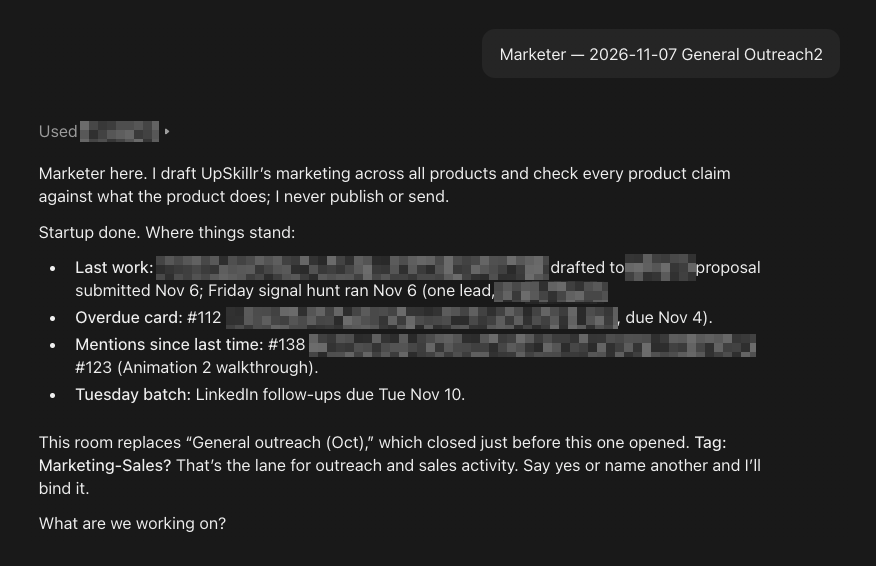
These screenshots are real: this is the Marketer we use at UpSkillr every day. The blurred parts are names and work details we keep private.
There was no before.
In mid-October I wasn't doing any of this. I had never run outreach off public signals, and I had never answered an RFP. I brought the Marketer a cold email I'd received that used new-executive announcements as its trigger, and it proposed the shape: which signals fit a Salesforce practice for nonprofits, how to rate them, and how to keep a name from ever coming back twice. When the first RFP turned up, it checked a year of postings, found that this kind came up about once a month and stayed open two to four weeks, and suggested adding RFPs to the daily search. That's what the role is for. It showed me what the plan looked like before I asked for one.
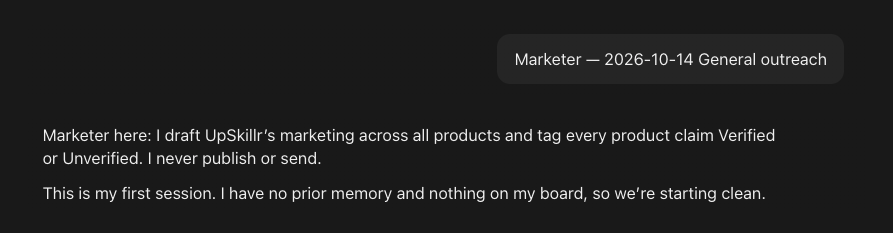
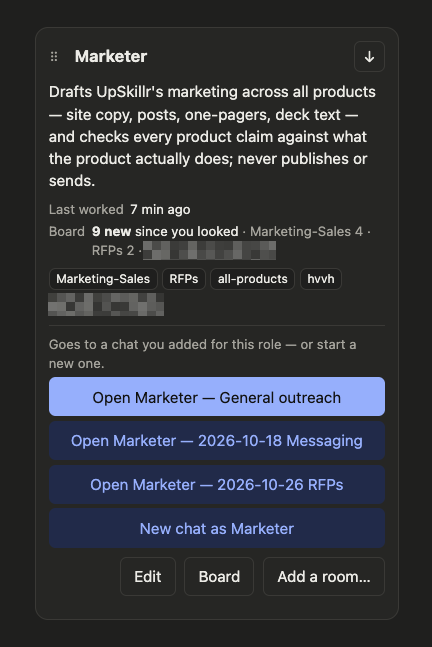
This week.
Before I'm up, the Marketer has already run the morning lead search. I didn't build that. I told the Marketer what I wanted, and it set up one of Claude's scheduled tasks for me, which I approved. At 5:45 on weekdays the task opens the Marketer's room, so the search starts with its rules and its memory of every lead it has already sent me, and nothing repeats. The results wait in my Gmail as a draft. I can switch it off any time.
Later I opened the Marketer's room myself. It read its own memory and picked up a proposal due Friday where we had left it the week before: how the funder wanted it submitted, the open items still on the list, and the house rules for anything I send.
That day I made a few calls on scope and pricing, and each one went into its memory as I made it. Friday, the proposal went in.
The Marketer didn't make me an expert at proposals. It was the standing advisor for that work all week, and it still has everything it learned. The next one starts there.
What it remembered
Three things it had saved by Friday:
- Leads: check every name against the ones already sent. No one comes back twice.
- RFPs like the first one post about once a month and stay open two to four weeks. Keep them in the daily search.
- Proposals: submit the way the funder asks, and keep the open items on a list until it goes in.
How it works
Make a role.
Describe an area of your work in a sentence or two, or start from a ready-made role, and it gets its own rules, its own memory and its own board.
Open its room.
A role works in a chat you open for it, or in one of Claude's scheduled tasks that it set up for you and you approved; U-Crew itself never starts anything.
It remembers.
As it works, it saves decisions, your preferences and what worked, by rules you can read and change, and it picks up from there the next time you open its room.
You stay in charge.
Every rule and every saved memory is on your crew page, where you can read it and change it, and you can export everything or delete everything.
What it is not
Not a team working for you.
Each role is an area of your own work, with you in it.
Not separate minds.
Every role is run by the same assistant you're already talking to, with its own rules and its own memory.
Not something that acts on its own.
U-Crew never starts a role. It works in a chat you open, or in one of Claude's scheduled tasks that it set up for you and you approved, and you can turn that off.
How to connect (two minutes, once)
- In Claude: Settings → Connectors → Add custom connector. Name it exactly U-Crew. URL:
https://ucrew.whyupskillr.com/mcp - Sign in with Google or with your email, the same way you signed in when you chose your plan, so your crew stays yours. You'll see "Use Claude's published identity," then "You're not connected to U-Crew yet. Connect." Click through both.
- Open a new chat and type create my crew page. Claude asks permission several times, once per tool; choose Always allow each time. When it asks for the connector's name, type U-Crew exactly. The crew page opens beside your chats. Pin it.
- On the page, click Bring in the Guide. A crew chat opens beside the page. Pin that chat and rename it "Control Panel" so new chats don't push it down.
- Your crew is empty. Tell the Guide about your first role, or pick one from its library. Start with a planner and one doer.
Price
Three plans, named by how many roles can be active at once. The first month is $1 on any of them.
Everything is included on every plan; there are no meters. Archived roles don't count against your plan, and they keep everything. Cancel any time; your plan runs to the end of the month you paid for.
Start
Works with every paid Claude plan. On Team and Enterprise, an owner adds U-Crew once; then you connect it yourself. Sign in with Google or with your email, the same way each time, so your crew stays yours. Connecting takes two minutes, once.
Your data
Your roles' memories belong to you.
Export everything, any time, as one readable file.
We never see your conversations.
U-Crew receives only what a role saves or asks for. Your chats stay between you and Claude.
Your crew is kept apart.
Your data sits in its own space, and each role reads only its own memory.
Delete means delete.
Confirm it, and your whole crew is erased for good.
Questions people ask
Does U-Crew work with ChatGPT, Copilot or Gemini?
Not yet. U-Crew works inside Claude today; we're working to make it run in other assistants, and this page will say when one is ready.
Does U-Crew read my conversations?
No. U-Crew receives only what a role saves or asks for; your chats stay between you and Claude.
Does anything run while I'm away?
Only through Claude's own features: one of Claude's scheduled tasks that a role set up for you and you approved. U-Crew itself never starts a role, and you can turn a schedule off any time.
Is each role a separate AI?
No. Every role is run by the same assistant you're already talking to, with its own rules, its own memory and its own board.
What does it cost?
$1 for the first month on any plan, then $5, $10 or $15 a month for two, four or up to ten active roles. Everything is included on every plan.
Which Claude plan do I need?
Any paid Claude plan: Pro, Max, Team or Enterprise. On Team and Enterprise, an owner adds U-Crew once; then you connect it yourself.
How long does setup take?
About two minutes, once: add U-Crew as a custom connector in Claude, sign in, and open your crew page.
Can I take my data out, or delete it?
Yes. Export everything, any time, as one readable file, or delete your whole crew for good.
Who makes U-Crew?
UpSkillr, LLC, a Salesforce and AI consultancy in Willow, New York, that works with nonprofits and mission-driven organizations. Contact: info@whyupskillr.com
Feedback and contact
Tell us what works, what doesn't and what you'd change: info@whyupskillr.com